Upload and manage drawings
Upload and manage drawings
The CAD Drawings library: every part with drawings, its Plex revision, the files and where they are stored.
Open Documents → CAD Drawings. People with CAD Drawings - View see the library and open drawings; uploading needs CAD Drawings - Admin.
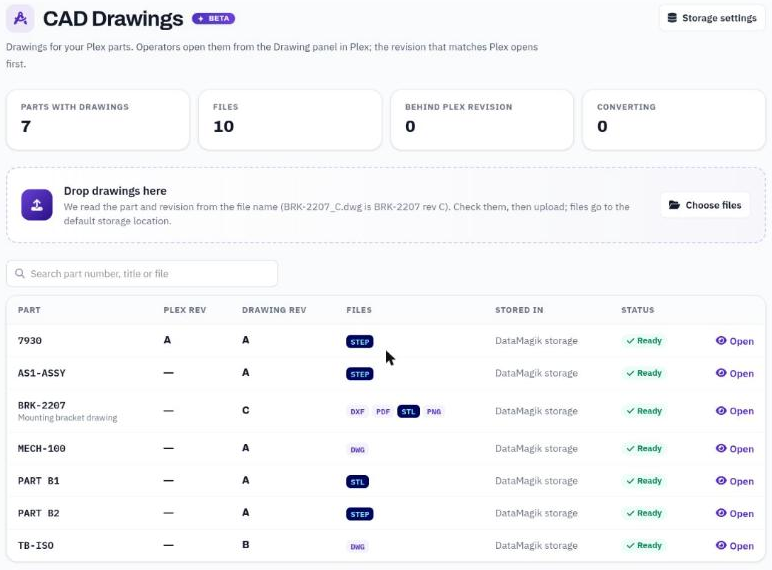
The library: totals, the upload area, and each part with its Plex revision, drawing revision, files, storage location and status.
The library
- The totals show the parts with drawings, the files, the parts whose drawing is behind the Plex revision, and the DWG files still converting.
- For each part: the Plex rev (the part's current revision in Plex), the Drawing rev shown in the viewer, the files by format, where they are stored, and their status.
- Search by part number, title or file name. Open opens the part in the viewer.
Upload drawings
- Drag files onto Drop drawings here, or press Choose files. You can add many at once.
- DataMagik reads the part number and revision from each file name:
BRK-2207_C.dwgis part BRK-2207, rev C. A revision can also be written asBRK-2207 rev CorBRK-2207-revC. Part numbers may contain spaces and underscores: only the last underscore separates the revision. - Check the part and revision for each file and correct them if needed.
- Press Upload. Each file goes to the default storage location, and a message says what was saved, for which part and revision, and where.
Upload the same file name again for the same part and revision to replace it; the old copy is kept out of sight rather than deleted. Upload a file for a new revision when the part's revision changes in Plex.
Revisions
The viewer opens the files for the part's current Plex revision. If there is none for that revision yet, it opens the latest revision on file and shows an amber warning, so nobody runs to an old drawing without knowing. Those parts are counted under Behind Plex revision.
DWG conversion
A DWG file is converted for viewing after it is uploaded, usually within seconds. While it converts, its status reads Converting DWG, and the viewer shows a converting message that updates by itself. If a file cannot be converted, the viewer says why, and the library shows DWG conversion failed (hover over it to see the reason). It can still be downloaded and opened in your CAD software. With CAD Drawings - Admin, press Retry beside it to convert it again, for example after the file server was back online.
DWG files on a file server are converted too: DataMagik keeps the converted copy in your DataMagik storage, so read-only file servers work and nothing is written to your server.