People, roles and admins in a Site family
Who can work in each Site, and with which role.
How access works in a family
- Roles apply per company. A role given in one Site applies in that Site only. An admin in one Site is not automatically an admin in another.
- Parent administrators are admins in every active Site. A parent administrator is a person whose home company is the parent and who holds DataMagik - Security there. Their access is shown as Admin · inherited.
- Consultants do not inherit. Someone who holds Security in the parent only through access from another company is shown as Not inherited: only home members of the parent inherit admin in Sites.
- Everyone else needs access to a Site and a role in it.
Credentials are separate: an inherited parent admin can see a Site's credentials, but needs a grant in that Site to run or build with them. See Who may use a credential.
The Sites: people page
Who can do this: a parent administrator: DataMagik - Security in the parent, as a home member.
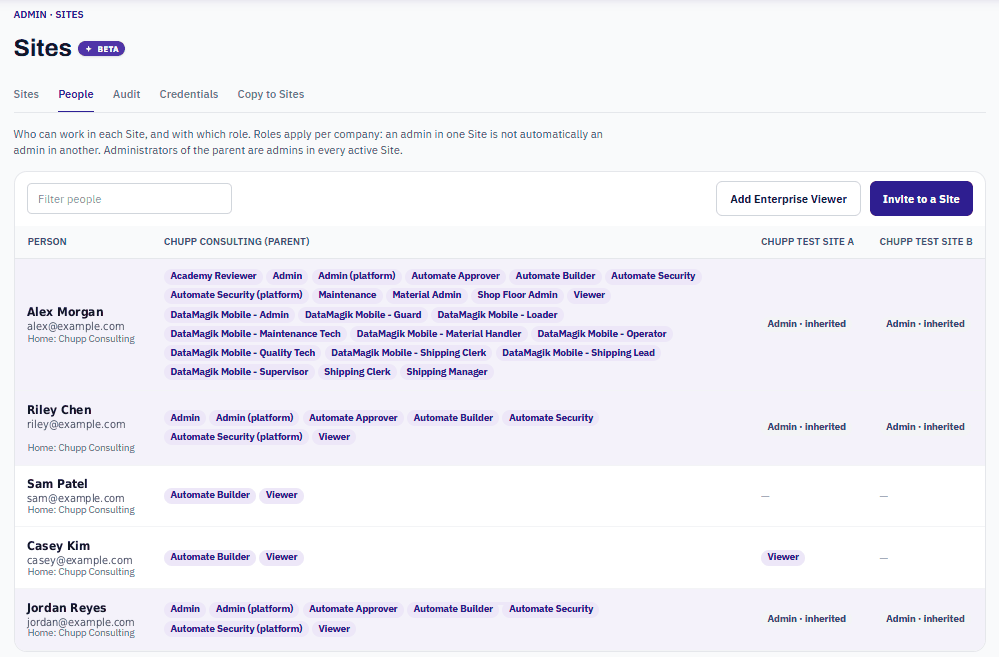
Open Admin → Sites: people in the parent. The page shows everyone in the parent and its Sites, with one column per company.
| In a cell | Means |
|---|---|
| Role names | The roles this person holds in that company. |
| Admin · inherited | A parent administrator, admin in this Site automatically. |
| No role | Has access to the company but no role in it. |
| No access (shown as a dash) | Cannot work in that company. |
| N credential(s) | Credential grants this person holds in that company. Open it to see Credential grants in company, including any Shared by the parent. |
Under each name you see Home: company, or Access grant from another company for someone from outside.
Change someone's roles in one Site
- Press the person's name.
- In Roles in company, tick the roles they need there.
- Press Save company roles. Their roles in other companies stay as they are.
Invite someone to a Site
- Press Invite to a Site and pick the Site.
- Choose Existing person for someone already in DataMagik, or New person and enter their first name, last name, username and email.
- Pick at least one role for the Site.
- Press Add to company and email invite. The link works once and expires in 7 days.
If the username or email is already in use, nobody is added: choose Existing person instead. If the person already has access to that Site, edit their roles there instead.
Remove someone from a Site
Open the person and press Remove from company. Their access to that Site and their roles there are removed. Nothing changes in any other company.
- You cannot remove someone from their home company here. Deactivate them in that company's user manager instead.
- You cannot remove your own Security role. Ask another administrator.
Enterprise Viewer
DataMagik - Enterprise Viewer is for people who need to see the whole family, such as executives. It is given at the parent only, to a home member of the parent.
- An Enterprise Viewer reads every Site through the Enterprise overview and the assistant, without signing in to each Site.
- The role only reads. An Enterprise Viewer cannot sign in to a Site.
To add one, press Add Enterprise Viewer on Sites: people, pick the person and press Make Enterprise Viewer.
Frequently asked questions
A Site manager should administer only their own Site. How?
Give them DataMagik - Security in that Site only. They become an admin there and nowhere else.
Why is a consultant not an admin in our Sites?
Inherited admin is only for people whose home company is the parent. Give the consultant a role in each Site they need.