CAD Drawings for Plex
The right drawing, at the right revision, on the Plex screen where the work happens.
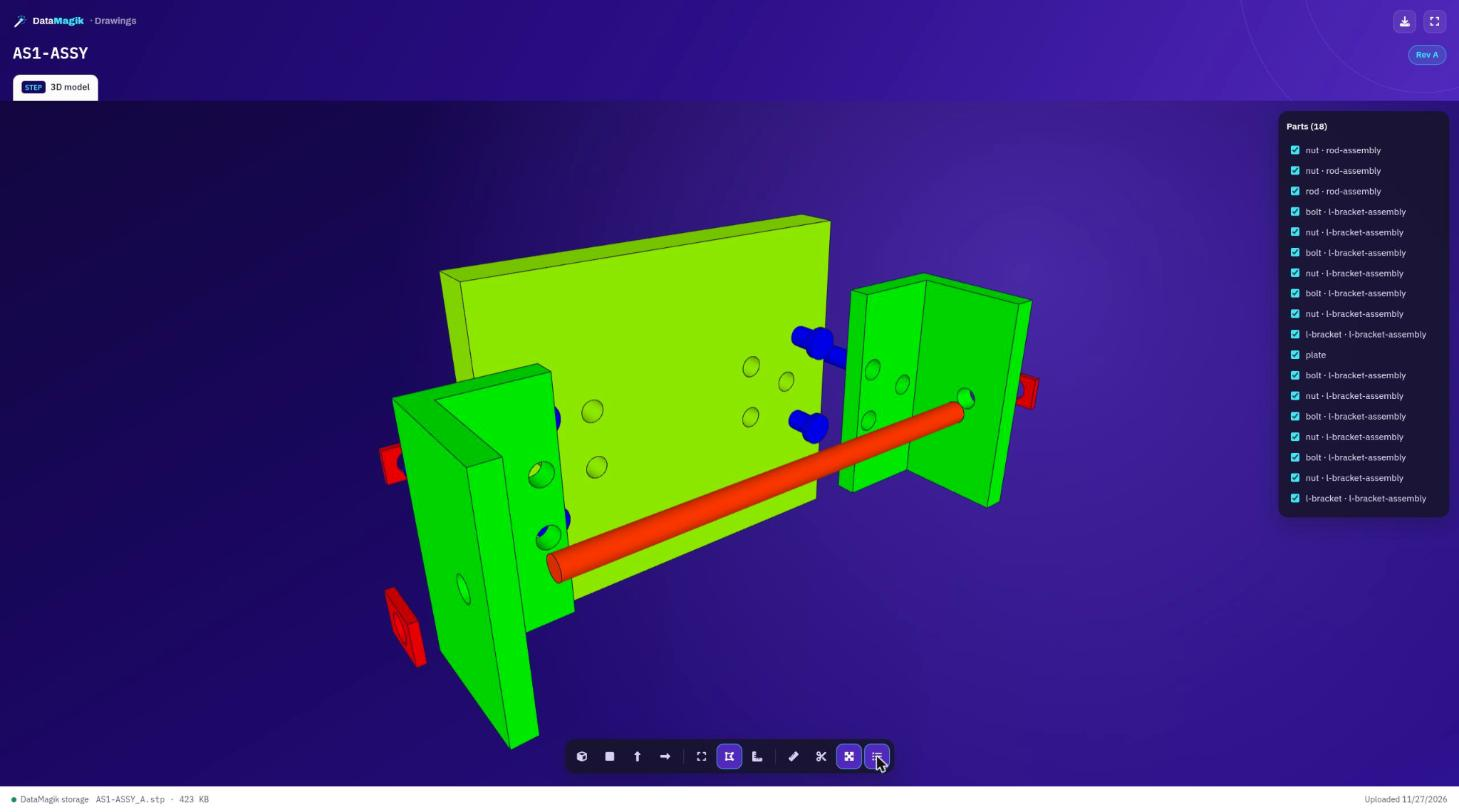
Store the drawings and 3D models for every Plex part, and open the one for the part's current revision from a Drawing tab right inside Plex: on the part screen, the Control Panel and Record Production. DWG, PDF, STEP and more, measured and sectioned in the browser.
What it is
The drawing is one click from the Plex screen
Operators, inspectors and setup techs should not hunt through shared drives for a drawing, or run to one that is a revision behind. CAD Drawings keeps every part's drawings and models by part number and revision, and a Drawing tab on your Plex screens opens the one that matches the part's current revision in Plex.
When Plex has moved to a new revision and engineering has not released its drawing yet, the viewer says so in amber before anyone builds to the old one.
From upload to the shop floor
-
1
Upload
Drop in a batch of files; the part and revision are read from each file name.
-
2
Stored where you choose
DataMagik storage, your own S3 bucket, or your file server.
-
3
Bound to Plex screens
One automation adds a Drawing tab to the part screen, the Control Panel or Record Production.
-
4
Opened at the current revision
The panel shows the part on screen, and follows when Plex moves to the next one.
On the Control Panel
A drawing for every part the job makes
On a multi-out job, the Drawing panel on the Workcenter Control Panel and Record Production shows a chip for each part the loaded job produces, read from the screen Plex already loaded. The operator switches between them in one tap, each at its own current revision.
Where the tab appears
- Part screens, with the part read from the address.
- Lists, with the part read from the selected row.
- The Control Panel and Record Production, with a chip per output part.
- Only for the roles you allow, at the company that holds the license.
The viewer
2D and 3D, in the browser, with no CAD seat
DWG and DXF
AutoCAD drawings open with their dimensions, layers and line types. DWG files are converted once on our servers, then open instantly for everyone.
Measure on the drawing
Distance, angle, radius and area on 2D drawings, in the drawing's own units, so nobody scales a printout.
3D models
STEP, IGES, STL, OBJ, 3MF and glTF. Orbit, standard views, section planes, exploded views and a parts list for assemblies.
Measure the model
Click two points for the distance, its X, Y and Z parts and the angle between the faces, in millimeters.
PDFs and images
Released PDF drawings, inspection sheets and reference photos sit beside the model for the same part.
Revision you can trust
A pill shows the revision on screen; amber means Plex has moved on and the drawing has not.
Your storage
Keep drawings where your engineers keep them
Use DataMagik storage, your own S3 bucket, or a folder on your file server reached through the DataMagik connector, which stays inside its folder and honors its size limit. Each drawing remembers where it was saved, and a folder pattern decides the layout, such as part, then revision, then file.
Test location checks a location end to end before anyone relies on it.
DataMagik storage
Works the moment the license is on.
Your own S3 bucket
Keys held as a company credential on the server, never in the browser.
Your file server
Through the DataMagik connector you already run on site.
Put the current drawing in front of the operator
Upload once, bind a Plex screen, and every part opens at its current revision.
Book a demoRelated Documentation
View All DocsDataMagik Documents
Create, version, and generate professional PDF and label templates with HTML, CSS, and Go template syntax.
Using the Document Designer
Create and manage the PDF/document templates DataMagik fills with your data.
Go Template Syntax Guide
Visual ZPL label designer
Design Zebra (ZPL) label templates visually, with RFID, printer settings, an exact preview and automatic scaling to each printer's DPI.
Plex Label Designer
Design Plex customer label formats in the browser and save them straight back to Plex.