Credential rules: who and what may use a credential
Decide which items and which people may use each credential. Nobody here ever sees the password.
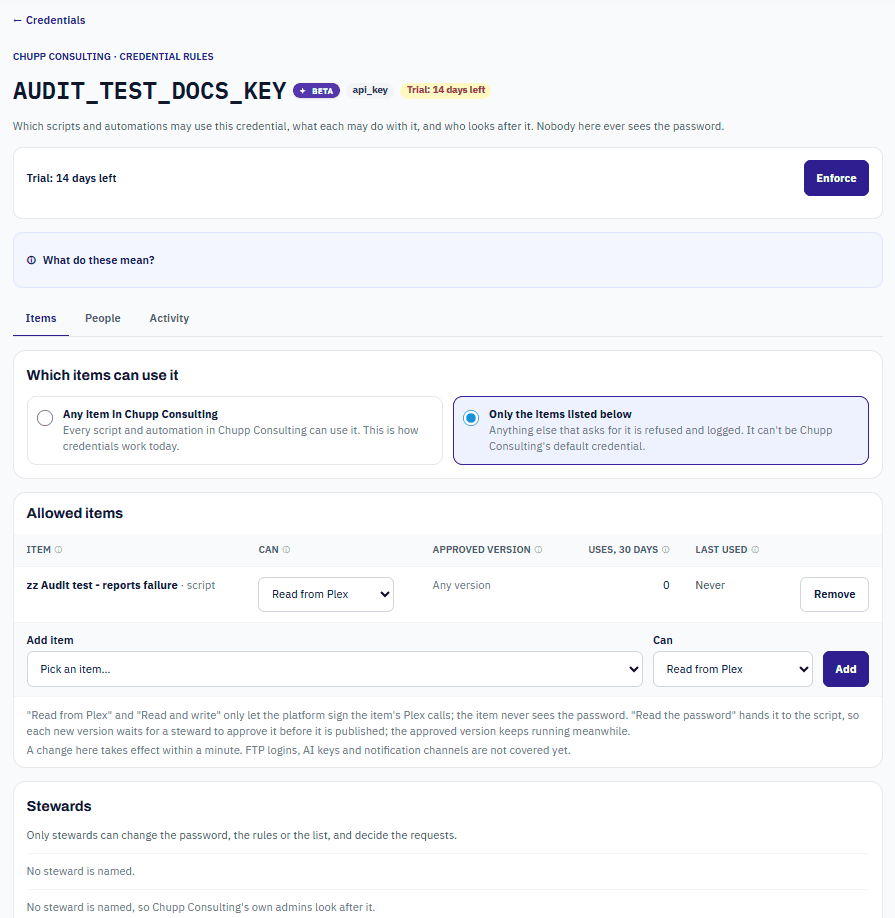
Out of the box, every script and automation in a company may use every credential, and every Builder may build with it. That is how credentials have always worked, and nothing changes until you change it. Each credential has a rules page where its stewards can narrow that down.
Open a credential's rules
Who can do this: DataMagik - Builder or DataMagik - Security can open the rules page and see the rules. Only the credential's stewards can change them. Changes also need the credential controls feature in your license; without it the rules stay applied and are read-only.
- Open Script Engine › Credentials.
- On the credential's row, press Who can use it.
The page has three tabs: Items, People and Activity. Above them are the trial or enforcement box and What do these mean?, a short legend of every term.
Three questions, in order
Every time something uses a credential, DataMagik asks:
- Can this company use it? It is the company's own credential, or a Plex login the parent company shares with this Site (Sharing credentials with Sites).
- Which items may use it? Any item, or Only listed items, each at a level (Which items may use a credential).
- Who may use it? Open, or Restricted to the people and roles granted (Who may use a credential).
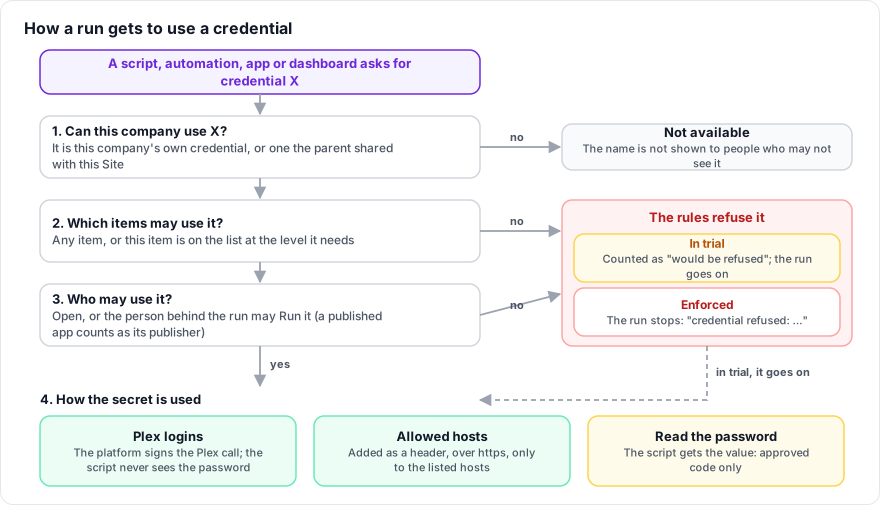
When the rules refuse a use, what happens depends on the credential's state:
- Trial (the first 14 days): the use is counted as would be refused and the run goes on.
- Enforced: the run stops with
credential refused: reason. A steward of the credential can grant access on its rules page (Script Engine › Credentials).
Nobody sees the password
The rules decide how a credential is used, never who can read it:
- Plex logins are used by the platform: it signs the Plex call and the script never sees the password.
- API keys with allowed hosts are added to the request as a header by the platform (Allowed hosts).
- Only an item listed with Read the password gets the value itself, and only for code a steward approved.
Stewards
Stewards look after a credential. Only stewards can change the password, the rules or the list, change where it may be sent, and decide requests.
- Name stewards on the Items tab under Stewards: pick the person in Name a steward and press Add steward. Giving someone Manage on the People tab also makes them a steward.
- While no steward is named, the company's own admins look after it: people whose home company this is and who hold DataMagik - Security, or a role with Credentials - Manage.
- Administrators of a parent company are never stewards of a Site's credentials by inheritance. If a Site has nobody who can look after a credential, a parent administrator can name a steward, but not themselves.
The Activity tab
- Who used it: uses in the last 30 days, with the person behind each run, the item it ran through, what started it (Started by), the number of uses and when it was last used. Stewards and admins see everyone; anyone else sees their own uses.
- Recent activity: the last 25 changes, such as rules, items, stewards, requests, approvals, allowed hosts and grants.
Changes take effect within a minute.
Not covered yet
FTP logins, AI keys and notification channels are not covered by credential rules yet.