DataMagik Automate
DataMagik Script Engine
Automate workflows with JavaScript — generate documents, call APIs, print labels, and more.
Aug 15, 2026 Read More
Server-side scripting for Plex — and a link that puts the results straight into Excel.
Write server-side JavaScript against Plex — read and write data sources, run SQL, call APIs, generate documents and send mail — then publish what a script returns into Excel, Power BI or Google Sheets as a link that refreshes itself.

Server-side scripting for Plex
When standard configuration runs out, the DataMagik Script Engine picks up. Write JavaScript that reads and writes Plex, calls your other systems, generates documents, prints labels and sends mail — and now publishes its results straight into Excel and Power BI. No servers to run, no build step, nothing to deploy.
Data for Excel
Publish any read-only script to a link. Paste that link into Excel and it arrives as a live table that refreshes on its own. There is no Power Query code to write, no export to email around, and no copy of the data going stale in somebody's Downloads folder.
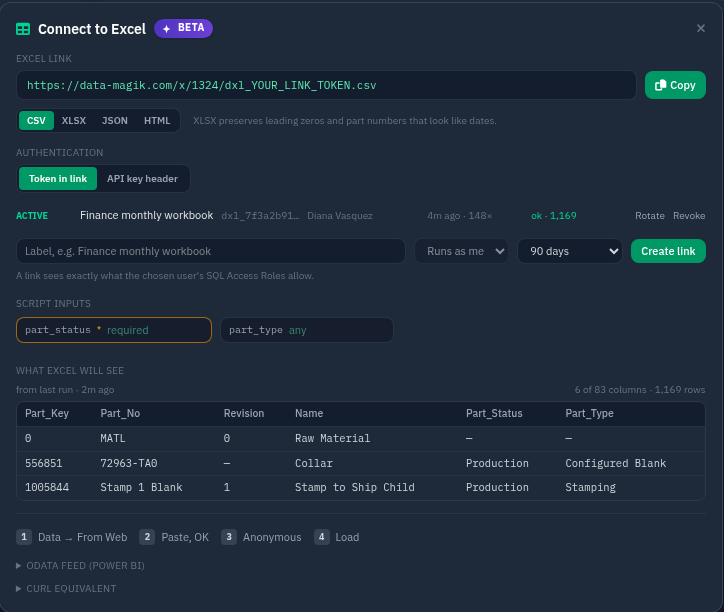
Open the script, click Connect to Excel, fill in any inputs, copy. The panel will not hand you a link until every required input has a value, so a link you copied is always complete.
Data → From Web, paste, OK. Choose Anonymous when Excel asks how to sign in — the credential is already in the link.
The workbook refreshes on open, on Refresh All, or on a schedule in SharePoint. The numbers are current because they were fetched, not because somebody remembered to re-send them.
The panel also previews exactly what Excel will see, taken from the script's last real run — so you find out the shape is wrong before the workbook does.
CSV for a table that renders instantly, or XLSX when a column holds an identifier rather than a quantity. XLSX carries the types, so 00124735 stays 00124735 and 3-4 does not quietly become a date.
The same script also publishes an OData feed with a typed schema. Get Data → OData feed and you are connected. $select, $top, $skip and $orderby all work, and paging holds one result so page two matches page one.
One formula, same link:
=IMPORTDATA("https://data-magik.com/x/1324/dxl_….csv")
A token in a URL is genuinely weaker than one in a header. It sits in browser history, it gets pasted into chat, and it travels inside every workbook that saves it. So the token is built to be worth almost nothing on its own.
One token, one script. It cannot call anything else, and it cannot read the script's source.
Read-only, always. A script marked as a write script can never be published at all.
It runs as a named person. It sees exactly what that person's SQL Access Roles allow, and nothing more.
It expires. Ninety days by default, revocable instantly, rate-limited, and in the audit trail on every call.
Rotation without a scavenger hunt. Issue a new token and the old one keeps working for a grace period, so workbooks catch up on their own. The owner is emailed before a link expires.
Or turn tokens off entirely. An administrator can require an X-API-Key header company-wide, and existing links stop working the moment they do.
Published, findable, governed

A page in the main navigation listing everything published in your company — what it contains, what inputs it takes, and a copy button. No Builder permission, no script editor, no ticket. A script that has been switched on but never run says so, rather than looking ready.

Every link in the tenant in one table: what it reads, who it runs as, who created it, when it was last used, and how the last call actually went — so a workbook that stopped working explains itself instead of becoming a support ticket. Select and revoke in bulk.
Shaping a script for Excel
A script that returns { data: { rows: […] } } needs no configuration at all — which is what most extract scripts already do.
function main(context) {
  const rows = odbc.executeQuery("parts_by_status", {
    status: context.part_status
  });

  return {
    data: {
      columns: ["Part_No", "Name", "Qty"],
      rows: rows
    }
  };
}
Return a columns array beside your rows and the order is exactly what you wrote. Leave it out and columns come back as the sorted union of the row keys — sorted rather than arbitrary, because an order that shifted between refreshes would break every workbook bound to the link.
Nested objects flatten one level into dotted columns. Anything deeper is JSON-encoded into the cell rather than reshaping the table under you.
The script's parameters arrive from the query string, so one published script serves every plant, customer or date range instead of one link per variation.
The editor flags it when a script stops returning a column it used to return — the change that silently empties a pivot table. Added columns are safe, and do not warn.
Turn on caching and a Refresh All across a department is a single run. The panel suggests a duration based on how long the script actually takes.
What a script can reach
These are not libraries you install and wire up. They are already in the runtime, already authenticated, and already governed by your permissions.
Call any Plex data source with URL routing, credentials, retry and backoff handled for you — reading and writing through the same APIs Plex uses itself.
Run saved, parameterised queries against Plex's data warehouse — synchronously for a quick lookup, asynchronously when the result is large.
Reach external REST APIs over an allow-listed host list, with secrets pulled from encrypted credential storage rather than pasted into code.
Generate from a template one at a time, in parallel batches, or synchronously when you need the file back in hand. Merge PDFs and return them straight out of the script.
Send directly or from a template, with generated documents attached. Generate-then-send is a handful of lines, not an integration project.
Print labels through on-site connectors, render ZPL from templates, and read or write files on machines behind the firewall.
Parse, validate, map and build interchanges structurally — with acknowledgements, conformance checking, duplicate detection and trading-partner routing.
Pull structured fields off scanned documents with vendor-aware extraction profiles, and call language models for the judgement calls a regular expression cannot make.
Rate shopping across carriers, parcel and LTL quotes, label creation and voiding, address validation and tracking.
Traceability series that issue one number or a batch, without two scripts racing each other to the same value.
Storage for the cross-references and mappings that have no home in Plex — readable and writable from any script, with optional expiry.
Administer DataMagik roles and assignments from a script, so onboarding and access reviews can be automated instead of remembered.
How scripts run
DataMagik Automate puts a button on the screen. The script runs with that screen's context and answers back in place.
Nightly extracts, hourly syncs, month-end packets. Set the cadence and stop thinking about it.
Excel's refresh is now a trigger. So is Power BI's, and Google Sheets'.
An authenticated HTTP call from any external system, with parameters in and results back.
Call a script mid-render to fetch what the template needs, or compute what the data does not carry.
Run one script from another, fan work out concurrently, or share common code through includes rather than copy-paste.
Security and governance
Every script runs in an isolated runtime with a wall clock and a memory ceiling. A runaway script is stopped, not left to burn the platform down around it.
Credentials are encrypted at rest, referenced by name, scoped to the scripts allowed to use them, and never written into logs.
Who may write a script, who may run one, and who may publish data out of one are three separate permissions. Every route is tenant-scoped.
Execution history keeps the inputs, the console output, the return value, the duration and the outcome — so “it did not work” becomes a timestamp you can open.
Build the logic your process needs, let DataMagik run it reliably — and hand the results to the people who live in a spreadsheet.
Book a DemoAutomate workflows with JavaScript — generate documents, call APIs, print labels, and more.
Run scripts automatically on a recurring cron schedule, with a live next-runs preview.
Trigger any script over HTTP — from an external system, a Plex action, or a curl command. Queue and poll, or wait for the result and get the script's return value as the whole response body.
Store the secrets scripts use and control which outside domains a script is allowed to call.
Publish a script to a read-only link that Excel loads directly — no Power Query code — plus an OData feed for Power BI.